
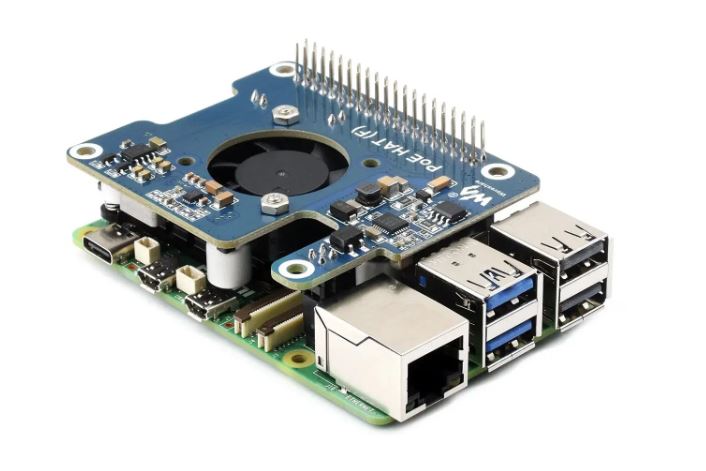
Waveshare introduces the PoE HAT(F), an impressive 802.3af/at-compliant Power-over-Ethernet (PoE) HAT+ board meticulously crafted for the Raspberry Pi 5. With a robust power delivery of 24W, this cutting-edge accessory not only seamlessly empowers your Raspberry Pi 5 but also incorporates advanced cooling features. The HAT comes equipped with an embedded fan, a heatsink, and two thermal pads, ensuring optimal temperature management for your single-board computer (SBC).
In a surprising twist, Waveshare has outpaced Raspberry Pi in the PoE HAT game. While the renowned UK-based company is diligently working on unveiling its L-shaped 25W “PoE+ HAT(+)” for the Raspberry Pi 5, Waveshare’s offering has already set a high standard. The existing official Raspberry Pi PoE+ HAT, capable of delivering up to 25.5 Watts, initially seemed promising for powering the Pi 5. However, due to the relocation of the PoE header, compatibility issues have arisen, necessitating the exploration of alternative solutions, such as the innovative Waveshare PoE HAT(F).
It’s noteworthy that Waveshare’s solution not only resolves the power requirements with its 24W output but also takes a proactive approach to cooling, addressing potential thermal challenges. As Raspberry Pi enthusiasts eagerly await the official release of the 25W “PoE+ HAT(+)” from the Raspberry Pi Foundation, Waveshare stands as a testament to swift innovation, offering a compelling solution that combines power efficiency and thermal management for the Raspberry Pi 5 ecosystem.
Waveshare PoE HAT(F) specifications:
- Supported SBC – Raspberry Pi 5 only
- Connected via 40-pin Raspberry Pi GPIO header and 4-pin PoE header
- PoE (Power Over Ethernet)
- IEEE 802.3af/at-compliant
- Input voltage – 37V-57V DC input
- Output
- 2-pin header – 12V/2A max
- GPIO header – 5V/4.5A max
- Fully isolated switched-mode power supply (SMPS).
- MP8759GD buck chip
- Cooling – Cooling fan, metal heatsink, and thermal pads for heat dissipation.
- Dimensions – 70 x 56.5 mm

Installation of the hardware components is designed to be a user-friendly process, ensuring a smooth setup experience. To commence, initiate the installation by carefully affixing the thermal pads onto both the Broadcom BCM2712 SoC and the accompanying memory chip. This crucial step lays the foundation for efficient heat dissipation, enhancing the overall performance and longevity of your device.
Following the secure application of thermal pads, proceed to position the metal heatsink over the Broadcom BCM2712 SoC and memory chip. Employ spring-loaded push pins to firmly secure the heatsink in place, establishing a reliable thermal interface. This meticulous arrangement contributes significantly to temperature regulation, safeguarding your hardware from excessive heat and potential performance issues.
With the heatsink securely in position, the next step involves the insertion of the HAT+ onto the Raspberry Pi. This process is akin to installing any other Raspberry Pi HAT, promoting familiarity and ease of use. Gently and precisely place the HAT+ on top of the thermal-enhanced components, ensuring a snug fit for optimal functionality.
For users seeking more in-depth technical insights and guidelines, a comprehensive set of detailed instructions is available in the accompanying wiki. This repository of technical information provides a valuable resource for users looking to delve into the intricacies of the installation process, offering clarity on various aspects and potential troubleshooting steps.
In summary, the installation process, characterized by the placement of thermal pads, attachment of a metal heatsink, and the seamless integration of the HAT+, is designed to be straightforward. The incorporation of these components is not only user-friendly but also prioritizes effective heat management, contributing to the overall reliability and performance of your Raspberry Pi system. For those desiring a deeper understanding of the technical nuances, the wiki serves as an invaluable reference, enriching the user experience with additional insights and detailed instructions.

Ensuring a smooth installation process, the initial step involves the straightforward installation of thermal pads onto the Broadcom BCM2712 SoC and memory chip. Following this, position the metal heatsink securely on top, utilizing the convenience of spring-loaded push pins for a hassle-free attachment. The final touch involves inserting the HAT+ onto the Raspberry Pi, seamlessly aligning it as you would with any other Raspberry Pi HAT. For those seeking in-depth technical insights, the comprehensive wiki provides a wealth of information.
Delving into the assembly specifics of the Waveshare PoE HAT F, the subsequent task is a breeze. A streamlined connection between the Raspberry Pi 5’s Ethernet jack and an 802at-compliant router or switch is all it takes to seamlessly acquire both power and network connectivity. This simplified process underscores the user-friendly nature of the Waveshare PoE HAT F assembly, ensuring a hassle-free experience for enthusiasts and professionals alike.
The Waveshare PoE Hat(F) is currently sold on Aliexpress for $27.26 including shipping and Amazon US for $29.99. You’ll also find it for sale on the company’s online store for $21.99 plus shipping.